TL;DR
- A Microsoft Fabric maturity assessment scores your environment 0–100 across five dimensions: Architecture, Fabric Item Architecture, Governance, Security, and DevOps.
- Most organizations land in the Foundational or Developing range on their first assessment — that's the baseline, not a failure.
- The output isn't just a score — it's a prioritized roadmap that tells you which gaps to fix first.
- Re-assess every 6–12 months, or immediately after capacity changes, M&A activity, or capacity throttling incidents.
- A 10-minute self-service assessment is available below.
Microsoft Fabric has consolidated data engineering, warehousing, real-time analytics, and business intelligence into a single platform. That consolidation accelerates adoption — but it also accelerates the pace at which architectural shortcuts, governance gaps, and security oversights compound. Most organizations don't discover these problems until they're visible in a dashboard outage, an audit finding, or a throttled capacity (or a runaway capacity bill).
A Microsoft Fabric maturity assessment is the structured way to surface those problems before they become incidents. It produces a quantitative view of where your Fabric environment stands today and a prioritized list of what to fix next.
In this article
- What Is a Microsoft Fabric Maturity Assessment?
- The 5 Microsoft Fabric Maturity Levels
- The 5 Dimensions of Fabric Maturity
- Maturity vs. Readiness: What's the Difference?
- Who Should Run a Fabric Maturity Assessment?
- What You Get from the Fabric Maturity Assessment
- How Often Should You Re-Run a Fabric Maturity Assessment?
- From a Fabric Maturity Assessment to a Fabric Remediation Roadmap
- Frequently Asked Questions
What Is a Microsoft Fabric Maturity Assessment?
A Fabric maturity assessment is a structured evaluation that scores your Microsoft Fabric environment across the dimensions that determine whether the platform can scale, stay secure, and deliver reliable insights. The output is a numerical score (on a 0–100 scale), a maturity level (Foundational, Developing, Standardized, Managed, or Optimized), and a per-category breakdown showing where the gaps live.
Unlike an audit, a maturity assessment is forward-looking. An audit asks "are you compliant?" A maturity assessment asks "are you ready for what comes next?" — the next workload, the next team onboarding, the next compliance requirement, the next executive escalation. The deliverable isn't just a pass/fail or a maturity score; it's a roadmap to improve your Microsoft Fabric maturity level.
The 5 Microsoft Fabric Maturity Levels
Every Fabric maturity model maps a numerical score to a qualitative level. The five levels describe a recognizable progression:
- Foundational (0–20) — Fabric is in use but largely undocumented. Workspaces, naming, and access have grown organically. Most environments at this level have no Git integration, no defined ownership, and no capacity monitoring.
- Developing (21–40) — Some patterns are emerging. A workspace strategy exists on paper but isn't consistently followed. Governance is reactive — applied to new items but not retrofitted to existing ones.
- Standardized (41–60) — Conventions are documented and broadly enforced. Git integration is in place for at least one workload type. Capacity monitoring exists but isn't acted on systematically.
- Managed (61–80) — The platform is operated, not just used. CI/CD pipelines are in place, sensitivity labels are applied automatically, and capacity is sized with headroom and monitored against SLAs.
- Optimized (81–100) — Fabric is run as a product. There is a platform team, an internal developer experience, automated quality gates, and continuous improvement against measurable KPIs.
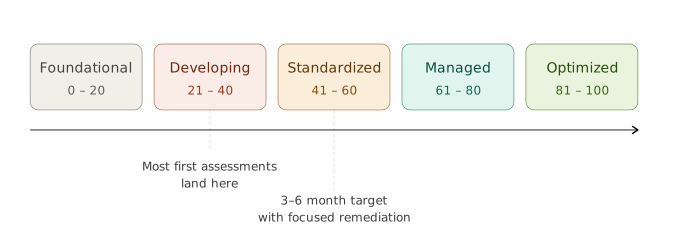
Initial assessments typically place organizations at the Developing stage, unless their Fabric rollout was exceptionally well-planned. Moving to Standardized is an achievable goal within three to six months, whereas reaching the Managed or Optimized levels should be viewed as a long-term roadmap spanning a year or more.
| Maturity Level | Typical Entry Point | Timeframe to Achieve |
|---|---|---|
| Developing | Standard Starting Point | Baseline |
| Standardized | With deliberate planning | 3–6 Months |
| Managed | Continuous Improvement | 12+ Months |
| Optimized | High-level Governance | 12+ Months |
The 5 Dimensions of Fabric Maturity
A credible Fabric maturity model evaluates five interlocking dimensions. These five dimensions aren't arbitrary — they map directly to the categories where Fabric implementations most often fail. A team can have a beautiful Lakehouse design and still be one departed engineer away from a credentials crisis.
1. Overall Architecture
Architecture covers the foundational decisions that everything else sits on: workspace strategy, environment separation between development, test, and production, capacity planning, and tenant-level configuration.
Mature architecture means a documented workspace topology with clear ownership, environments that are genuinely isolated rather than logically separated by naming convention, and Fabric capacity (F-SKUs) sized against real workload patterns rather than guessed at.
Tenant settings are reviewed and intentionally configured rather than left at Microsoft's defaults.
A common gap at this layer is the "one workspace trap" — everything deployed into a single shared workspace because it was easier on day one — which becomes structurally expensive to unwind once dozens of items and downstream consumers depend on it.
2. Fabric Item Architecture
Item architecture is about the design choices inside the platform: Lakehouse layout, ingestion patterns, data modeling, and OneLake organization.
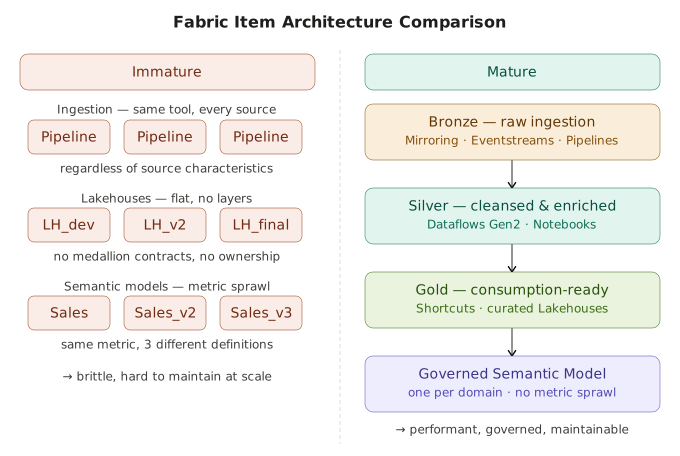
Mature environments use a deliberate medallion architecture (Bronze, Silver, Gold) with clear contracts between layers, choose ingestion mechanisms based on source characteristics — mirroring for operational databases, shortcuts for cross-workspace reuse, Dataflows Gen2 for low-code transformation, Eventstreams for real-time data — rather than defaulting to whichever option the developer learned first.
Semantic models are governed to prevent the sprawl of multiple models defining the same metric differently, and data modeling decisions reflect downstream consumption patterns rather than convenience for the ingestion team.
The choices made here determine how performant and maintainable your platform becomes at scale.
3. Governance
Governance covers data ownership, data quality strategy, lineage tracking, sensitivity labeling, Purview integration, and tenant settings that control how data flows out of Fabric.
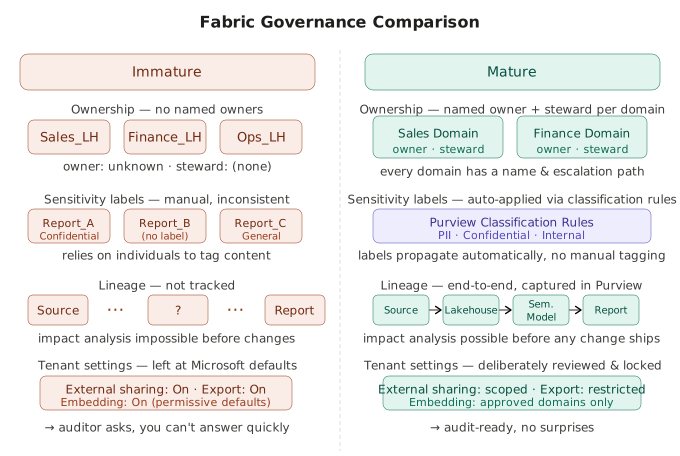
Mature governance means every data domain has a named owner and a steward, sensitivity labels are applied automatically based on classification rules rather than relying on individual users to tag content, lineage is captured end-to-end so impact analysis is possible before changes ship, and tenant settings around external sharing, export, and embedding have been deliberately configured rather than left permissive.
Governance gaps are invisible until they're catastrophic — the first time an auditor asks "show me everyone with access to PII data and how that access was granted," an immature environment cannot answer the question quickly or completely.
4. Security
Security in Fabric covers workspace access control, credential management, network isolation, and identity strategy.
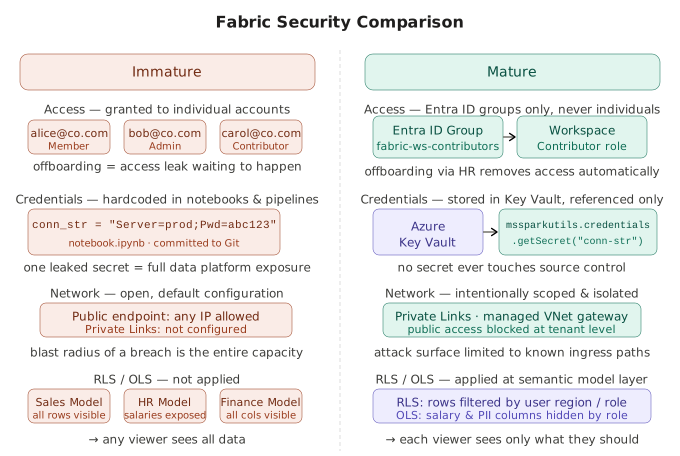
Mature security means access is granted exclusively through Entra ID groups (never to individual accounts), credentials live in Key Vault and are referenced rather than hardcoded in notebooks or pipelines, and Fabric network access is intentionally configured. Row-level and object-level security (RLS/OLS) are applied at the semantic model layer for sensitive content.
Misconfigured tenant settings or improper access control configuration can risk your entire data platform — and the blast radius of a single mistake (a misconfigured workspace, a leaked secret, a missed offboarding) is much larger in Fabric than in most platforms because so much sits behind a single identity and capacity boundary.
5. DevOps
DevOps is the dimension that distinguishes "Fabric in use" from "Fabric being operated."
It covers Git integration for Fabric items, Deployment Pipelines, configuration management across environments, and CI/CD for the artifacts that change most often (notebooks, semantic models, pipelines).
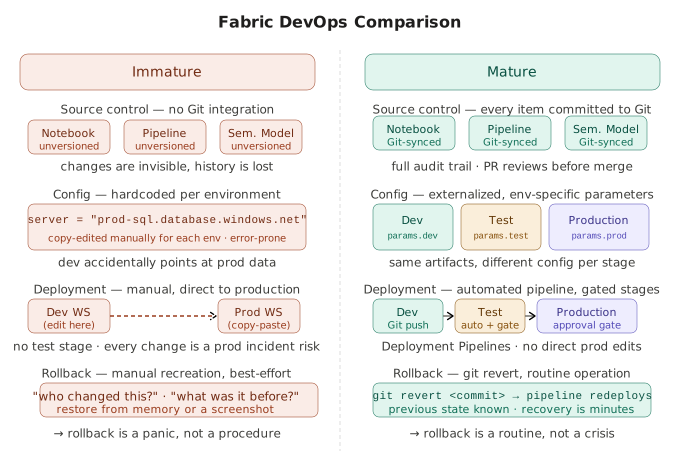
Mature DevOps means every Fabric item lives in source control, environment-specific configuration is externalized rather than hardcoded, deployments are automated and gated, and rollback is a routine operation rather than a panic.
Without DevOps maturity, every change is a production incident waiting to happen — and the cost of that immaturity scales with platform adoption, not linearly but combinatorially.
Maturity vs. Readiness: What's the Difference?
The terms "maturity" and "readiness" are often used interchangeably, but they answer slightly different questions. Maturity describes the overall health of an existing Fabric deployment. Readiness describes whether the environment is prepared for a specific next step — a new workload, a regulatory audit, a major capacity increase, or a migration from another platform.
Both share the same underlying signal: are the right foundations in place? A high-maturity environment is, by definition, ready for most reasonable next steps. A low-maturity environment will struggle with whichever readiness question you ask.
If you haven't deployed Fabric yet — or you're still early enough that foundational decisions are reversible — start with a Microsoft Fabric planning assessment instead. That guide walks through the seven domains to lock in before you create your first Lakehouse.
Who Should Run a Fabric Maturity Assessment?
Any team that has been actively using Microsoft Fabric for three or more months will benefit from a maturity assessment. The specific situations where it pays off most clearly:
- Teams scaling beyond a proof-of-concept. What worked for one workspace and three users rarely works for ten workspaces and a hundred users.
- Organizations migrating from Power BI Premium or Azure Synapse. Lift-and-shift assumptions break down quickly in Fabric's unified architecture.
- Companies preparing for a compliance review or audit. A maturity assessment surfaces the issues an auditor would find — months earlier and at lower cost.
- Leadership teams evaluating Fabric investment. A maturity score creates a shared, defensible language for budget and roadmap conversations.
What You Get from the Fabric Maturity Assessment
A well-run maturity assessment produces four concrete artifacts:
- An overall maturity score. A single number on a 0–100 scale that lets you track progress over time.
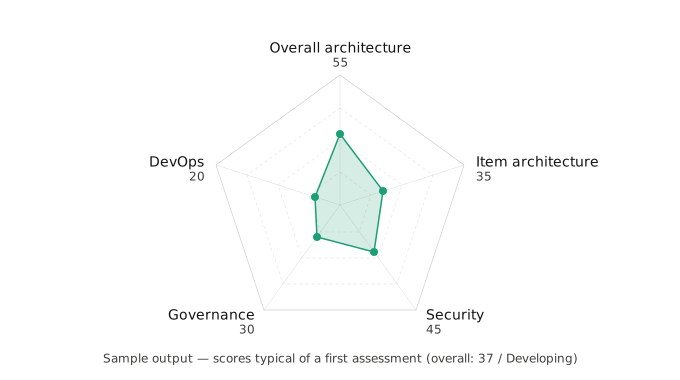
- A category breakdown. A score for each of the five Fabric maturity dimensions, visualized as a radar chart. This identifies which dimensions are pulling the score up and which are dragging it down — and many of the gaps surfaced here line up with the most common Microsoft Fabric anti-patterns.
- A gap list. The specific issues found, grouped by impact level (critical, high, medium).
- Prioritized recommendations. A sequenced list of remediations — what to fix first, what's safe to defer, and what requires a bigger conversation.
Ready to assess your Fabric maturity?
Take the free 10-minute assessment and get a personalized maturity score across 5 key dimensions.
Start Free AssessmentHow Often Should You Re-Run a Fabric Maturity Assessment?
A maturity assessment is not a one-time exercise. Fabric is evolving rapidly, your implementation is growing, and your team's standards are (hopefully) rising. Most organizations should re-assess:
- 3–6 months after initial deployment — long enough for real patterns to emerge.
- Every 6–12 months thereafter — to track maturity gains and catch regressions.
- After any trigger event that materially changes the environment.
The trigger events worth re-assessing immediately:
- Infrastructure & platform shifts — capacity SKU changes, tenant migrations, or major Microsoft Fabric feature releases that change defaults or introduce new item types.
- Strategic & organizational events — mergers and acquisitions, scaling beyond a proof-of-concept, migration from legacy systems, or an upcoming compliance review.
- Red-flag triggers — capacity throttling incidents, data quality complaints reaching leadership, or independent prototyping sprawl across business units.
From a Fabric Maturity Assessment to a Fabric Remediation Roadmap
A score is only useful if it changes what you do next. The most valuable output of a maturity assessment is the sequencing it enables: which gaps you address first.
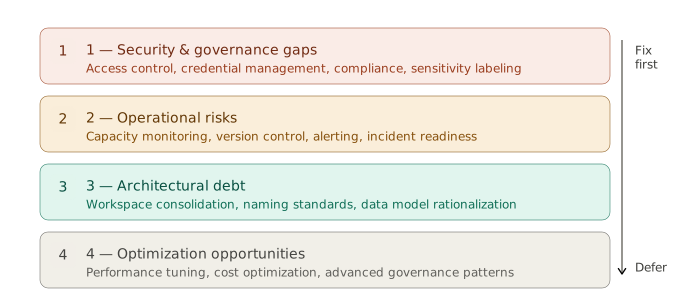
A reasonable prioritization framework is to tackle issues in this order:
- Critical-impact security and governance gaps — anything that exposes data or breaks compliance.
- Operational risks — capacity blindness, missing version control, no monitoring.
- Architectural debt — workspace consolidation, naming standardization, data model rationalization.
- Optimization opportunities — performance tuning, cost optimization, advanced governance.
The goal isn't to score 100. It's to know exactly where you stand, why, and what's worth doing about it.
Frequently Asked Questions
How long does a Microsoft Fabric maturity assessment take?
A self-service maturity assessment takes about 10 minutes to complete and produces an immediate score and gap list. A consultant-led engagement is more thorough — typically 1–2 weeks — and includes stakeholder interviews, tenant configuration review, sample workspace inspection, and a written roadmap. The self-service version is the right starting point for most teams; the consultant-led version becomes valuable when the gaps surfaced require cross-functional remediation or executive buy-in.
What's a "good" score on a Fabric maturity assessment?
There's no universal target — what matters is the trajectory and which dimensions are weakest. As a rough benchmark, most organizations score in the 25–45 range on their first assessment (Foundational to Developing). A score of 60+ (Standardized) is a realistic 6–12 month target after focused remediation. Scores above 80 (Managed/Optimized) are uncommon and typically reflect organizations with a dedicated platform team. A balanced score across the five dimensions is more valuable than a high overall score with one critical gap.
How is a maturity assessment different from a Fabric audit or readiness assessment?
An audit is backward-looking and compliance-focused: "did you follow the rules?" A maturity assessment is forward-looking: "are you ready for what comes next?" A readiness or planning assessment is pre-deployment — it evaluates whether the foundations are right before the first Lakehouse exists. Maturity assessments assume Fabric is already in use and measure how well it's being run.
Can I run a Fabric maturity assessment myself, or do I need a consultant?
You can absolutely run one yourself, and the self-service XTIVIA Fabric Maturity Assessment is designed for exactly that. The questions are written so a data engineering lead, BI manager, or platform owner can answer them without external help. A consultant becomes valuable when the assessment surfaces gaps that span teams (security, governance, infrastructure) or when the remediation roadmap needs to be defended to leadership and translated into a funded program.
What does the maturity assessment actually evaluate?
The assessment scores your environment across five dimensions: overall architecture (workspace strategy, capacity, tenant configuration), Fabric item architecture (Lakehouse design, ingestion patterns, semantic models), governance (ownership, sensitivity labeling, lineage), security (access control, credentials, network isolation), and DevOps (Git integration, Deployment Pipelines, CI/CD). Each dimension is scored independently so you can see where the gaps are concentrated. Most organizations find their lowest scores in DevOps and governance, which are the dimensions that require the most cross-functional discipline.
How often should I re-run the assessment?
Run it 3–6 months after your initial Fabric deployment, then every 6–12 months thereafter. Re-run it immediately after any material change: a capacity SKU change, a tenant migration, an M&A event, or any incident that suggests the platform is being operated outside its design (capacity throttling, governance escalations, security findings).
See how your Fabric environment scores.
The XTIVIA Microsoft Fabric Maturity Assessment evaluates your environment against architecture, governance, security, item design, and DevOps best practices — including the most common Fabric anti-patterns.
Take the Free AssessmentAbout the author

Vivek Agarwal
CTO, XTIVIA
Vivek leads digital transformation and technology modernization initiatives for XTIVIA customers as a trusted advisor. He has been working with Microsoft Fabric since its public preview — planning, architecting, and delivering green-field implementations, as well as assessing existing environments, developing remediation plans, and leading their execution. A seasoned problem-solver, his goal is to help customers solve their biggest challenges and achieve great outcomes. Connect on LinkedIn →