
TL;DR
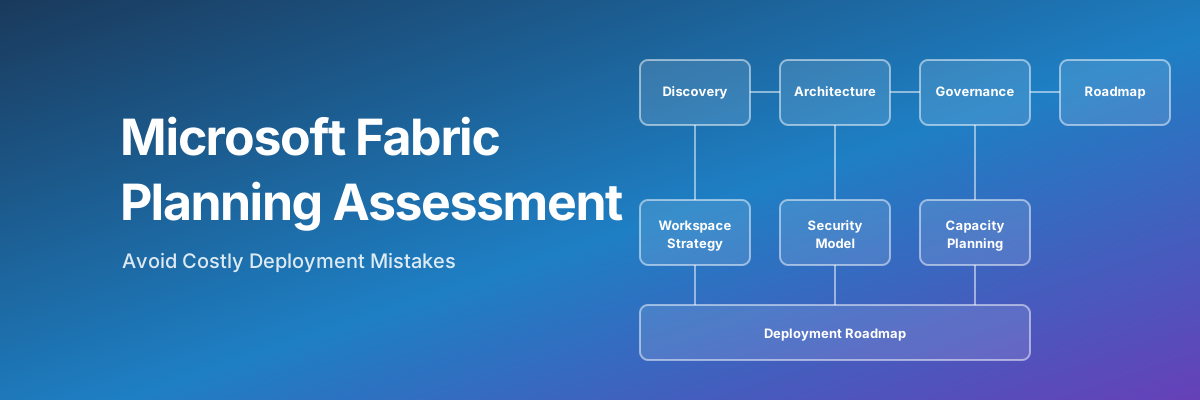
- A Microsoft Fabric planning assessment is a structured pre-deployment review that locks in workspace, capacity, governance, and security decisions before the first Lakehouse is created.
- The highest-ROI activity in any Fabric adoption — every hour spent in planning saves roughly a week of remediation work later.
- Typical engagement runs 2–4 weeks and produces an architectural decision log, a Fabric technical design blueprint, governance framework, and phased implementation roadmap.
- Run a planning assessment before deployment; run a maturity assessment 3–6 months after. They are complementary, not alternatives.
Most of the painful problems we encounter on Microsoft Fabric implementations weren't introduced last week. They were architectural decisions made in the first two weeks of the project — choices about workspaces, capacity, naming, governance, and access — that calcified as data and dependencies accumulated. By the time the pain becomes visible, unwinding the decision is far more expensive than making it correctly the first time.
A Microsoft Fabric planning assessment (also called a Fabric readiness assessment) is the structured way to front-load those decisions. It is the highest-ROI activity in any Fabric adoption — and the one most teams skip because they're eager to start building.
In this article
What Is a Microsoft Fabric Planning Assessment?
A Fabric planning assessment is a structured pre-deployment review that evaluates organizational readiness, licensing strategy, architectural decisions, and governance policies before the first Fabric item is created. It is fundamentally different from a maturity assessment:
- Planning assessment — pre-deployment, decision-focused, output is a roadmap.
- Maturity assessment — post-deployment, gap-focused, output is a score and a roadmap.
The deliverables of a planning assessment typically include a decision log capturing every architectural choice and the reasoning behind it, a phased deployment roadmap, a recommended Microsoft Fabric capacity sizing, a workspace and environment topology, and a governance and security framework ready to enforce on day one.
Why Planning Is the Highest-ROI Activity in Fabric Adoption
Several patterns recur across Fabric implementations and explain why planning matters more here than on most platforms:
- Lakehouse rearchitecture is expensive to fix post-launch. Once data accumulates and downstream reports depend on the medallion layout, restructuring becomes a multi-month project. Foundational choices for partitioning, table strategy, and OneLake organization are functionally permanent within 90 days because changing them requires rewriting all historical data and coordinating massive updates across every connected report.
- Governance retrofitting costs 3–5× more than governance-first. Adding sensitivity labels, lineage tracking, and access policies after data and users are in place means coordinating across teams, retraining users, and reworking pipelines that bypassed standards.
- Workspace consolidation is brutal. Teams that start with one shared workspace and add governance "later" almost always have to split it later — moving items, rewriting references, coordinating with downstream consumers.
- Ad hoc access management creates long-term operational fragility. Without an upfront Entra ID group based access control strategy, workspace permissions become a manual audit exercise that grows more complex with every new team member. Retrofitting a secure, group-based identity model after go-live means reworking established access patterns across the entire tenant, which is significantly more expensive than implementing it correctly from the start.
The planning assessment isn't an academic exercise. Every hour spent in a planning conversation saves roughly a week of remediation work later.
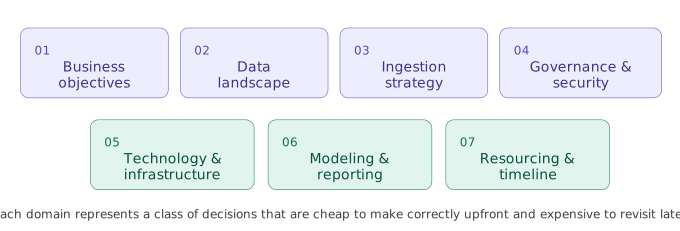
The 7 Microsoft Fabric Planning Domains
A complete Fabric planning assessment covers seven domains. Each one represents a class of decision that is cheap to make correctly upfront and expensive to revisit later.
1. Business Objectives & Success Metrics
This domain answers the question every Fabric program should be able to answer in a single sentence: what problem is Fabric being adopted to solve, and what does success look like in measurable terms?
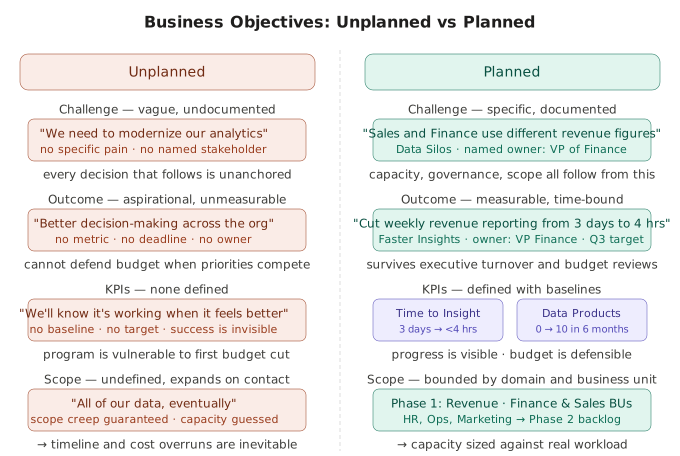
Mature planning here means defined KPIs — Time to Insight, number of governed data products delivered, decisions accelerated, legacy platforms decommissioned — rather than vague aspirations like "modernize analytics." The output of this domain is a written success definition that survives the inevitable executive turnover and roadmap pressure. Without it, every subsequent decision is unanchored: capacity is sized against a guess (even when done right, this is an educated guess at best), governance is justified against nothing, and the program becomes vulnerable to budget cuts the moment a competing priority emerges.
Most failed Fabric programs failed here first, not in the technical layers downstream.
2. Data Landscape & Inventory
Before designing the destination, you need a clear-eyed view of the source.
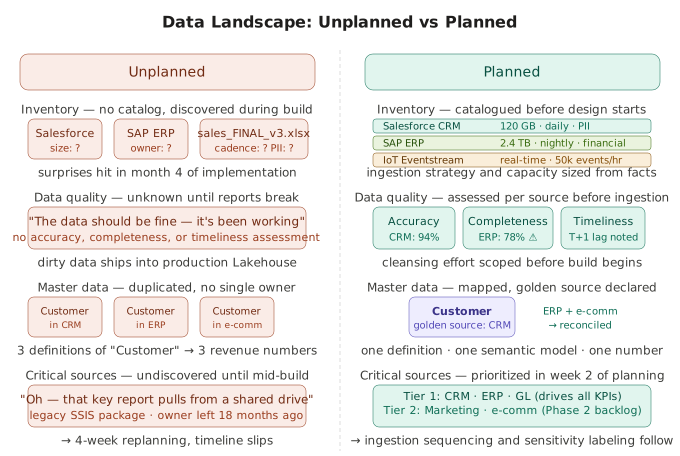
This domain catalogs every system that will feed Fabric: source databases, SaaS platforms, file shares, streaming sources, and existing analytics platforms being migrated. For each, you capture data volumes, refresh cadence, criticality, current quality issues, master data definitions, and known PII or regulated content.
The inventory is also where you discover the surprises — the Excel file that drives a key report, the legacy SSIS package nobody owns, the Salesforce sandbox that's been treated as production for two years. These surprises always exist; the question is whether you find them in week two of planning or month four of implementation.
The deliverable is a prioritized data domain map that informs everything downstream — ingestion strategy, sensitivity labeling, and the sequencing of which workloads land in Fabric first.
3. Data Ingestion Strategy
Fabric offers more ingestion mechanisms than any prior Microsoft data platform — data mirroring, OneLake shortcuts, Eventstreams, Data Pipelines, Dataflows Gen2, and notebooks — each with different operational, latency, and cost profiles. Mature planning means choosing the right tool for each source rather than defaulting to whichever option the team learned first.
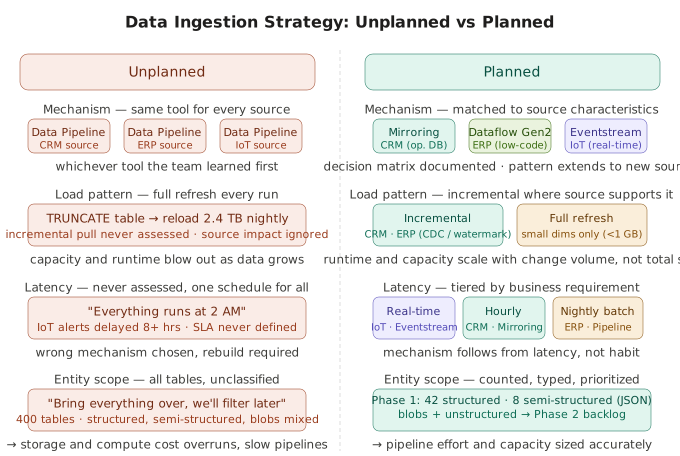
Mirroring is ideal for operational databases where you want a near-real-time replica without ETL. Shortcuts are the right answer for cross-workspace reuse and avoiding data duplication. Dataflows Gen2 fits low-code transformation and citizen developer scenarios. Pipelines and notebooks handle complex orchestration and code-heavy transformation. Eventstreams handle real-time events from IoT or application telemetry.
The deliverable is an ingestion decision matrix mapping each source to a chosen mechanism, with the reasoning documented — so when a new source arrives in month nine, the team can extend the pattern instead of reinventing it.
4. Data Governance & Security
Governance and security planning has to happen before deployment because both are dramatically more expensive to retrofit than to build in.
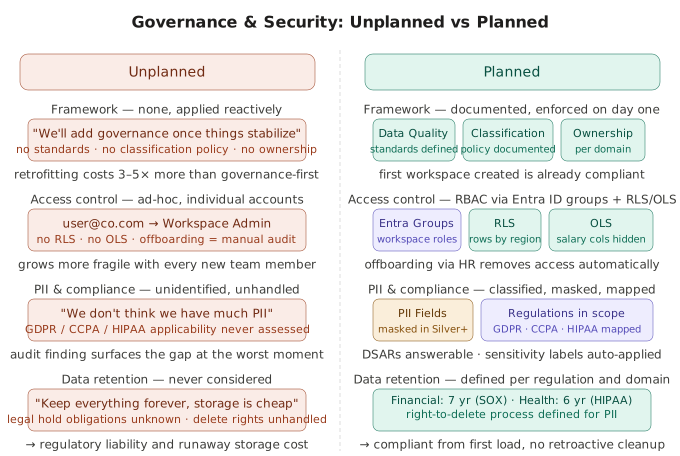
This domain covers RBAC strategy (Entra ID groups, never individual accounts), row-level and object-level security (RLS/OLS), regulatory framework mapping (GDPR, CCPA, HIPAA, SOX, industry-specific regimes), PII handling and masking strategies, sensitivity label taxonomy and auto-application rules, Purview integration for cataloging, and tenant-level settings around external sharing, export, and embedding.
The output is a governance and security framework ready to enforce on day one — so the first workspace created is already compliant, the first dataset already labeled, the first pipeline already routing through approved patterns. Done well, governance becomes invisible scaffolding. Done late, it becomes a separate program that competes with feature delivery for attention and budget.
5. Technology & Infrastructure
This domain aligns Fabric with the broader Microsoft and enterprise stack it has to live alongside.
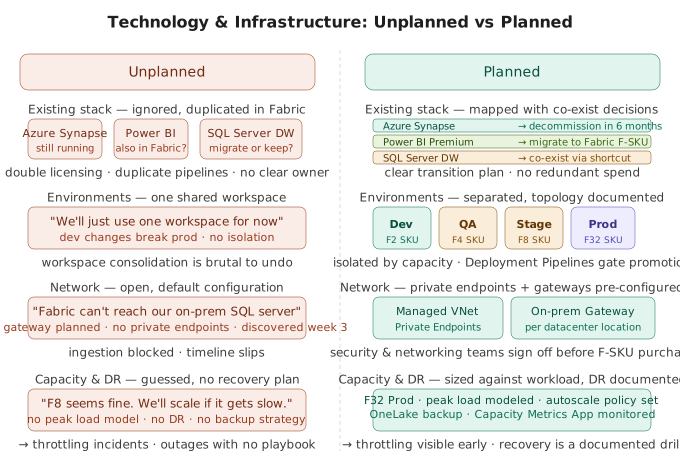
Decisions here include environment topology (Dev/QA/Stage/Prod separation, whether through workspaces, capacities, or tenants), network security posture (Managed VNet, Private Endpoints, IP Address Whitelists), identity strategy (Entra ID configuration, conditional access), disaster recovery and backup strategy for OneLake and semantic models, and integration with adjacent Microsoft services (Azure Data Lake, Synapse, Power Platform, Purview).
The deliverable is an infrastructure baseline document that the platform team can hand to security, networking, and identity teams for review before the first F-SKU is purchased. Skipping this domain is how organizations end up with Fabric workspaces that can't reach their on-premises data sources, or capacities that bypass corporate network controls.
6. Data Modeling, Storage & Reporting
Fabric offers multiple compute and storage paradigms — Lakehouse, Warehouse, KQL Database, Eventhouse — and the choice between them is consequential and often misunderstood.
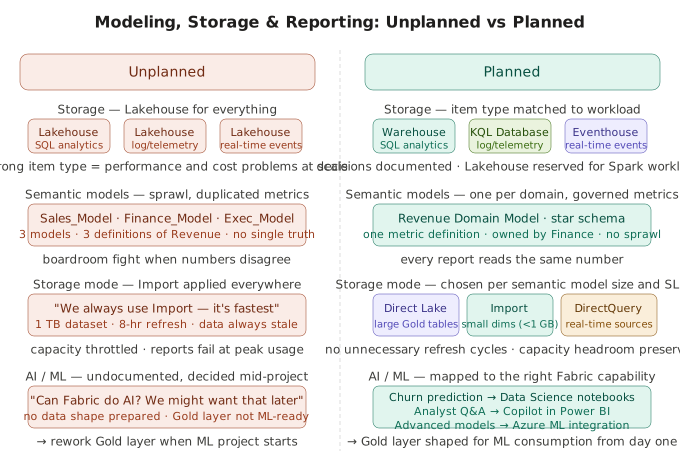
Mature planning means selecting the right item type per workload (Lakehouse for general-purpose data engineering with Spark, Warehouse for SQL-first transactional analytics, KQL Database for log and telemetry analytics, Eventhouse for real-time streaming), defining the semantic model strategy (one model per domain, governed metric definitions, no sprawl), establishing reporting patterns (paginated reports, Direct Lake mode, composite models), and documenting AI/ML readiness — which workloads will need Copilot, which need Data Science notebooks, which need to expose data to Azure ML or external models.
This domain also covers the medallion architecture itself: how Bronze, Silver, and Gold layers are organized in OneLake, what contracts exist between layers, and who owns each. Decisions here are nearly impossible to reverse once production reports depend on a particular shape of data.
7. Resourcing, Licensing & Timeline
The final domain is the one that turns architecture into a deliverable program.
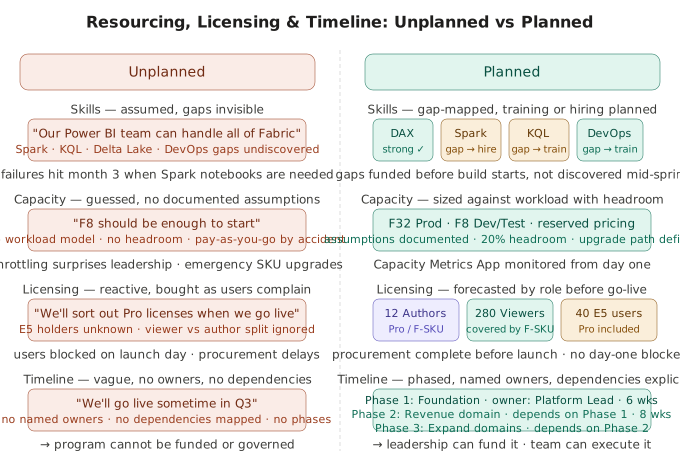
It covers skills assessment (does the team have Spark, KQL, DAX, Power Query, and platform engineering capability — and where are the gaps?), Microsoft Fabric capacity sizing with documented assumptions and headroom, Power BI Pro licensing strategy for end users, project structure (centralized platform team vs. federated domain teams, or a hybrid), stakeholder roles and responsibilities, change management and training plans, and a realistic phased timeline.
Skills assessment matters more than most teams admit — Fabric's breadth means a team strong in Power BI can still be weak in Spark, Delta Lake internals, or DevOps practices, and pretending otherwise produces predictable failures three months in.
The output is a resourcing plan, a licensing forecast, and a timeline with named owners and explicit dependencies — the artifact that lets leadership fund the program and lets the platform team execute it.
The Full Planning Checklist
For each of these 7 domains, our detailed checklist on the XTIVIA blog walks through every question we ask during a Fabric planning engagement — useful as a self-service worksheet.
Read the 7-Domain Fabric Planning ChecklistHow a Planning Assessment Workflow Looks
A typical XTIVIA planning engagement runs over 2–4 weeks and follows this structure:
- Discovery interviews. Structured conversations with data leadership, security, infrastructure, and the teams who will use Fabric day-to-day. Goal: understand current state, constraints, and goals.
- Architecture sessions. Expert-led sessions that cover various Fabric architecture topics - tenant architecture (capacities, workspaces, environments, data domains), data storage, data ingestion, orchestration, medallion layers, semantic models, Power BI apps, reports, and data agents.
- Governance & security framework. Fabric workspace and item security, data security, sensitivity labels, access patterns, RBAC roles, data ownership model, and compliance mapping ready to enforce from day one.
- Phased deployment roadmap. Sequenced workstreams — what gets built first, what's deferred, and what dependencies exist between phases.
- Decision log. Every architectural decision, the alternatives considered, and the reasoning. This becomes the single most valuable artifact 12 months later when someone asks "why did we do it this way?"
Signs You Need a Planning Assessment
You probably need a planning assessment if any of these are true:
- You have a go-live date but no documented workspace strategy.
- Multiple teams are already prototyping in Fabric independently.
- No naming convention has been agreed upon.
- The security model is "we'll figure it out later."
- Capacity sizing is a guess and nobody know how it will be monitored and/or what will trigger an adjustment.
- Nobody has clearly answered: who owns each data domain?
Each of these is a deferred decision. Deferred decisions in Fabric become structural constraints quickly — and many of them show up later as the most common Microsoft Fabric anti-patterns.
Have a Fabric deployment coming up?
XTIVIA can run a planning assessment before you deploy — typically 2–4 weeks, saving months of rework downstream.
Talk to a Fabric ExpertPlanning vs. Maturity Assessment: Which Do You Need?
The two are complementary, not competing:
- Planning is for teams that haven't deployed yet, or are early enough to make foundational decisions reversibly. Output is an architectural blueprint and an implementation roadmap.
- Maturity is for teams already running on Fabric who want to know how their environment scores against best practices. Output is a score and a gap list.
Best practice is to run both at different points in the lifecycle: a planning assessment before deployment, then a Microsoft Fabric maturity assessment 3–6 months in to verify the plan was executed well and to surface anything new that emerged.
Frequently Asked Questions
How long does a Microsoft Fabric planning assessment take?
A consultant-led planning assessment typically runs 2–4 weeks end to end. The first week is discovery interviews with data leadership, security, infrastructure, IT, BI, and end-user teams. The second and third weeks produce the architecture, capacity, governance, and security recommendations. The final week is a phased roadmap and decision log review with stakeholders. Smaller organizations with a single workload can complete planning in 1–2 weeks; larger enterprises with multiple business units, regulated data, or complex source landscapes often need 4–6 weeks.
What's the difference between a planning assessment and a readiness assessment?
The two terms are largely interchangeable in the Fabric ecosystem and refer to the same pre-deployment exercise. "Planning" emphasizes the output — the documented decisions and roadmap. "Readiness" emphasizes the input — whether the organization has the foundations in place to deploy successfully. Some teams use "readiness" for a lighter self-assessment (skills, governance maturity, infrastructure) and "planning" for the full architectural engagement. Functionally, you want the same artifact in either case: a written set of decisions and a sequenced plan.
When is the right time to run a planning assessment?
The ideal window is after Fabric has been approved as a strategic direction but before key architectural and implementation plans are developed. And certainly before any Fabric artifacts have been created. However, if you're already mid-deployment and recognize the planning was skipped, it's still worth running — the cost of correcting course at week six is far lower than the cost of running into the same issues at month six.
Can we run a Fabric planning assessment internally, or do we need a consultant?
You can run it internally if you have three things: a Fabric architect with real implementation experience (not just certification), a project lead empowered to convene security, infrastructure, and data leadership for decision-making, and the discipline to write down decisions and reasoning even when the answers feel obvious. Most organizations adopting Fabric for the first time don't have all three — particularly the first one — which is why consultant-led planning engagements are common at the start of a Fabric program. Once the first workload is in production, internal teams can usually run subsequent planning cycles for new workloads.
How does planning assessment cost compare to fixing problems later?
The economics are heavily skewed toward planning. A typical planning engagement is a defined-scope, fixed-fee 2–4 week investment. The remediation work that planning prevents — workspace consolidation, governance retrofitting, data security clean-up, semantic model rationalization — is open-ended, high-stress, and frequently requires rebuilding work that's already been delivered. The 3–5× cost multiplier on governance retrofitting alone usually justifies the planning engagement. The harder-to-quantify benefit is avoided incidents: the production outages, audit findings, and credibility hits that don't happen because the foundations were right from day one.
What does a Fabric planning assessment actually deliver?
Four concrete artifacts: a decision log capturing every architectural choice and its reasoning, a Fabric technical design blueprint, a governance and security framework ready to enforce on day one, and a phased deployment roadmap with named owners and dependencies. Together these become the operating manual for the first 12 months of the Fabric program — and the artifact that new team members read when they join.
If you're already deployed, head over to our guide on Microsoft Fabric maturity assessments — that's the right starting point. If you're still in the planning phase, the work you do now will pay back many times over.
Skip the guide! I just want to take the maturity assessment.
Take the free 10-minute assessment and get a personalized maturity score across 5 key dimensions. And unlock more comprehensive feedback with your email address (no spam).
Start Free AssessmentAbout the author

Vivek Agarwal
CTO, XTIVIA
Vivek leads digital transformation and technology modernization initiatives for XTIVIA customers as a trusted advisor. He has been working with Microsoft Fabric since its public preview — planning, architecting, and delivering green-field implementations, as well as assessing existing environments, developing remediation plans, and leading their execution. A seasoned problem-solver, his goal is to help customers solve their biggest challenges and achieve great outcomes. Connect on LinkedIn →